
Xiegu X-6200: Using the WR12 to receive the QO-100 ham radio geostationary satellite.
–By Ed Durrant DD5LP
Document Version 1.0
This document does not describe the installation of the WR12 add-on to your X-6200; please refer to the other guide from Radioddity for that information.

I will not be describing QO-100 in this article either; suffice to say it is the only current amateur radio geo-stationary satellite with a transponder using an uplink from the 13cm (2.3 GHz) band and downlink in the 3cm (10 GHz) band.
When I heard that a wide band receiver was going to be added to the X-6200 radio with a coverage from 54 MHz to 1000 MHz, I initially thought, yes, nice you could then receive (but not transmit on) 4m, 2m, and 70cm bands but there are plenty of radios around that do that already. What became interesting was when I thought about the frequencies around 740 MHz.


Hmm, what band is around there, you ask? Well, there is none but… It is the Intermediate frequency that most people use to receive the QO-100 satellite. 740 MHz? Well, the satellite actually transmits on 10 GHz, but using a standard TV satellite dish and LNB (Low noise block – the bit that sticks out in front of and points into the dish) signals from the QO-100 output of 10489-10500 MHz are converted down to around 740 MHz. You see, an LNB is what we, as amateurs, would normally call a receive-converter. This one is built into the antenna and has a few strange needs that you should understand before you start on the project I have just completed.

An LNB can have one, two or four coax cables going to it, which is for when multiple households share the dish for Satellite TV reception. In our case, we only need to use one connection – it doesn’t matter which one. Indeed, in my case, as I suspected that the 20-year-old one that I had may be faulty so I bought a new “universal LNB” with just one output for €3 (special offer). I’ll talk later, why this might not have been the best choice.
Well, now we have the LNB on the dish and have mounted it to a mast, and the one coax cable (normally with the F-type connectors on each end) comes back to your shack. One coax cable – how does it get power from the preamp/receiver converter? Well the DC supply is sent up the coax using what is called a Bias-T unit to inject the voltage and while some satellites use horizontally polarised antennas and others vertical (on several satellites some channels are horizontal and others vertical to get more stations in the available bandwidth) this voltage is used to switch antennas in the LNB – 12v is vertically polarised and 18v is horizontally polarised.
Another trick used in LNBs is that they have two oscillators for the converter. One is at 9.75GHz and the other is 10.6GHz. This enables one antenna to cover the complete band used by the satellite in two smaller blocks for the satellite tuner, connected to, or built within, modern TV sets. As different voltages for signalling on the coax cable have already been used, the TV system designers changed to using an audio tone to switch between high and low bands in the LNB. No tone means low band, and 22 kHz means the high band oscillator will be used.
It’s amazing how one cable can be used for so many different actions concurrently.
All of this signalling is taken care of within Satellite TV tuners, but we need to look at what we need to do when using the Satellite dish and LNB to receive QO-100. The good news is that we don’t use the high band oscillator, so we don’t need to generate the 22 kHz signal. The narrow band (CW/SSB/Digital data area) use vertical polarisation, and so we just need to supply 12V. If you want to listen to or somehow watch the digital amateur TV that uses the Wide-band repeater in QO-100, which uses Horizontal polarisation and so you will need to feed 18V to the coax.

No matter whether it is 12 or 18V, how do we get it onto the coax without applying across the input to the receiver? Here we use a Bias-T unit which capacitively isolates the RF in and RF out sockets while applying voltage (usually via an inductance) to the output socket. Now you could build one of these yourself, but since they only cost €12-15 to buy, why bother?
Here’s the next small challenge. The cable from the LNB on the dish has an F-Type connector on it. The Bias-T unit has two SMA connectors, and the WR12 output is a BNC socket. Some adapters can be bought to go between the connections, but please try to get just one converter for each switch of connector type; don’t use multiple to make the connection. We are working here at 740 MHz, and every new connection will lose some received signal.
The larger challenge, however, is aligning the dish correctly. This has to be pointing at the correct angle into the sky (elevation) and in the correct direction (azimuth). There are websites such as dishpointer.com and even Smartphone apps, such as Satfinder, to help you align the antenna. There are also physical in-line signal meters that should also help. My experience with all of these has been variable. There is a reason that a satellite dish installer these days has a device that looks like a spectrum analyser with him, but such a device costs far too much for our one hobby task.
Dishpointer.com is where I started and once you have entered your location and selected the name of the satellite (in our case Es’hail-2 – which is the satellite, QO-100 is just one of many payloads) it not only gives you accurate aiming information, it actually shows you on a satellite overhead picture view where your antenna needs to see. I was lucky in my case, I have a clear line-of-sight from my shack’s balcony – had I been on the other side of the house, the only option would have been to put the dish on the top of the roof. So, we have our Azimuth and elevation angles, but we also receive a “skew” angle. Remember I said TV satellites use either vertical or horizontal polarisation? Well, in this world (or out of it) nothing is perfect and the route from my location to QO-100 needs a slight twist on the polarisation and this is done simply by twisting the LNB in its mount to the required angle (there are marks on the LNB case) – I needed -13° your value will be different).

You can trust the values from Dishpointer, which is more than can be said for the smartphone app. In an ideal world, you would put the phone side along the side of the dish mount and adjust to the correct azimuth. I did this to start with, and could not hear anything from QO-100. I tried frequencies of the TV transmitters onboard Es’Hail-2, thinking they would be stronger than the amateur transmitter – I could hear nothing. Later, I realised that Es’Hail-2’s TV signals are beamed at specific areas, such as North Africa and the Middle East, so I would never hear them here.
At this point, I was starting to think that something in my system was broken, so instead of using the X6200 and WR12, I set up my RTL-SDR dongle and repeated my tests – still nothing. To reduce more items out of the equation, I ran a longer cable to a Satellite TV tuner and again scanned to find signals. Nothing. OK, the final action is to point the dish at the normal ASTRA satellite that provides satellite TV across Europe, and at least test the new LNB and
dish. I set up the dish direction using the smartphone app and …nothing – even the strong signals were not getting through.
At this point, I noticed that my dish was not pointing the same way as the neighbours, which was certainly pointing at ASTRA, so I swung the dish by feel to about the same angle, and I started to get a signal. I adjusted the elevation angle, and then I got all of the Astra stations! At this point, I checked my in-line signal meter – nothing! It’s a good point that it was so cheap that I can strip it for parts for other projects! Don’t buy a “satellite installers dish alignment signal meter” They’re not worth the money, even the cheap ones.
I realised the problem was that the app was giving me a direction that was almost exactly 10° off! Once I knew this, I went back to the RTL-SDR set-up and swung the dish around to 10° different to where the app showed for Es’Hail-2 and BINGO, I could just hear one of the QO100 beacons. A little more trimming and I was receiving QO-100 CW, SSB, FT8 and PSK signals on the RTL-SDR! I then tried the WR12 again, and surprise, surprise, this time it was also receiving QO-100 signals. It may sound obvious, but pointing the dish in the correct direction is rather important!
One question you may be asking is How do I know the frequency of the station as I am tuning the Intermediate Frequency (IF) around 740MHz, but the signal is actually at 10 GHz. Well, at the start, I told you the LNB has two conversion oscillators in it, and as we are only using the low band, we use the 9.75 GHz one. So, add what the radio shows to 9.75 GHz, and you have the frequency you are receiving – all done right? In principle, yes, however, as accurate frequency is not critical for TV reception, that 9.75 GHz may not be exactly 9.75 GHz, indeed it often isn’t – so you need to calculate the difference from 9.75 GHz for your calculations and then adjust accordingly. How to check what the real frequency is against what you see? Well, three beacons are running constantly on QO-100, and they are accurate. You can also find a station on the X6200-WR12 and then the same station via the BATC WebSDR at eshail.batc.org.uk/nb/ and then see where the radio says it is (adding 9750 MHz to the displayed frequency) and checking the difference.
Once you know what the actual frequency of the LNB oscillator is, you can put it into a spreadsheet to allow quick calculations. In my case, I also have the QO100 Band plan as part of my spreadsheet.
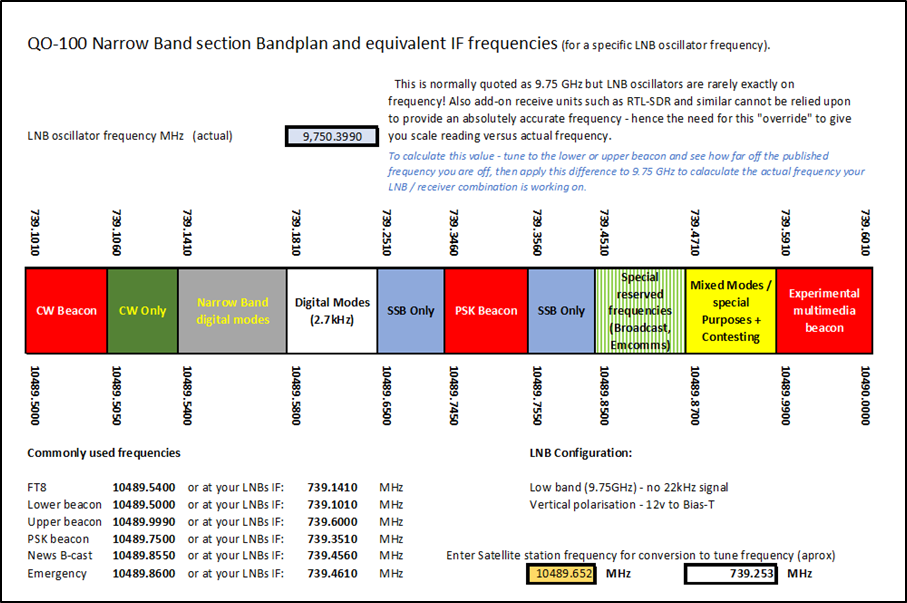
Remember I said I bought a “bargain basement” LNB? Well, for €3 I wasn’t complaining, however, there is a better option. One whose oscillator is closer to 9.75 GHz, and that does not drift nearly as much as my LNB. This is one that is used, it seems, by the majority of people receiving QO-100. It is called the “Bullseye 10 kHz TCXO LNB”, in which 10 kHz refers to maximum drift and not frequency of operation. This big thing is that this, far better LNB is available for under €30. I await its delivery in the next few days, but for now, I’m happy that I can now listen to QO-100 on my Xiegu X-6200.
 DD5LP / G8GLM / VK2JI blog
You must be logged in to post a comment.